Monaco editor is the editor that powers Visual Studio Code. It is licensed under the MIT License and supports IE 11, Edge, Chrome, Firefox, Safari, and Opera. It is well-suited for writing Markdown, JSON, and many other languages, offering colorization, auto-complete, and many other features. Its rich API also lets you extend the editor further.
If you have a form where you want the user to enter Markdown or code, Monaco Editor is a great alternative to a plain textarea. In this post, we'll see how to integrate the editor like any other input element, so its content is automatically included in the POST request. The target HTML looks like this:
HTML
<form method="post">

    <div class="form-group">
        <label for="Title">Title</label>
        <input id="Title" class="form-control" type="text" />
    </div>

    <div class="form-group">
        <label for="Content">Content</label>
        <!--
            👇 Custom element to display the Monaco Editor.
               The content of the editor is submitted with the form when you submit the form.
        -->
        <monaco-editor id="Content" language="json" name="sample" value="My content"></monaco-editor>
    </div>

    <button class="btn btn-primary">Submit</button>
</form>
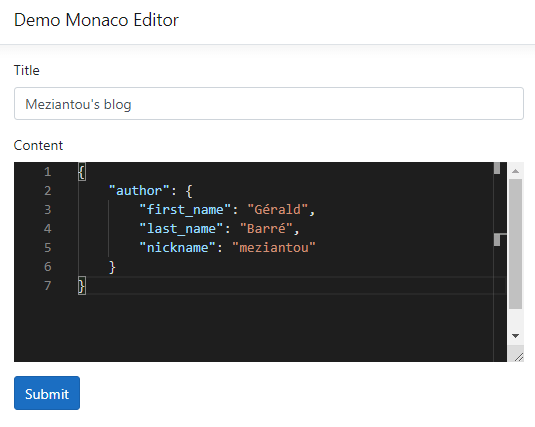
#Integrating Monaco Editor into a web page
First, let's download Monaco Editor:
Shell
npm install --save monaco-editor
Now we can integrate the editor into a web page:
HTML
<form method="get" id="MyForm">

    <div class="form-group">
        <label for="Title">Title</label>
        <input id="Title" class="form-control" type="text" />
    </div>

    <div class="form-group">
        <label for="Content">Content</label>
        <div id="Content" style="min-height: 600px"></div>
    </div>

    <button class="btn btn-primary">Submit</button>
</form>

<script>
    var require = {
        paths: {
            'vs': '/node_modules/monaco-editor/min/vs',
        }
    };
</script>
<script src="node_modules/monaco-editor/min/vs/loader.js"></script>
<script>
    require(['vs/editor/editor.main'], () => {
        // Initialize the editor
        const editor = monaco.editor.create(document.getElementById("Content"), {
            theme: 'vs-dark',
            model: monaco.editor.createModel("# Sample markdown", "markdown"),
            wordWrap: 'on',
            automaticLayout: true,
            minimap: {
                enabled: false
            },
            scrollbar: {
                vertical: 'auto'
            }
        });
    });
</script>
#Submit the content of the editor like an input
When you submit a form, the browser creates a FormData object and adds an entry for every input, select, and textarea that has a name attribute. You can include custom data by handling the formdata event (documentation), which exposes a FormData object you can populate. Here, we use it to include the content of the Monaco Editor instance.
JavaScript
<script>
    require(['vs/editor/editor.main'], () => {
        // Initialize the editor
        const editor = monaco.editor.create(document.getElementById("Content"), {
            ...
        });

        const form = document.getElementById("MyForm");
        form.addEventListener("formdata", e =>
        {
            e.formData.append('content', editor.getModel().getValue());
        });
    });
</script>
Rather than repeating this setup every time you use the editor in a form, you can create a custom element that encapsulates the logic.
#Wrap Monaco Editor into a custom element
One of the key features of the Web Components standard is the ability to create custom elements that encapsulate functionality on an HTML page. Custom elements are well-supported:
 Source: https://caniuse.com/#feat=custom-elementsv1
Let's create the custom element.
TypeScript
/// <reference path="../../node_modules/monaco-editor/monaco.d.ts" />

class MonacoEditor extends HTMLElement {
    // attributeChangedCallback will be called when the value of one of these attributes is changed in html
    static get observedAttributes() {
        return ['value', 'language'];
    }

    private editor: monaco.editor.IStandaloneCodeEditor | null = null;
    private _form: HTMLFormElement | null = null;

    constructor() {
        super();

        // keep reference to <form> for cleanup
        this._form = null;
        this._handleFormData = this._handleFormData.bind(this);
    }

    attributeChangedCallback(name: string, oldValue: any, newValue: any) {
        if (this.editor) {
            if (name === 'value') {
                this.editor.setValue(newValue);
            }

            if (name === 'language') {
                const currentModel = this.editor.getModel();
                if (currentModel) {
                    currentModel.dispose();
                }

                this.editor.setModel(monaco.editor.createModel(this._getEditorValue(), newValue));
            }
        }
    }

    connectedCallback() {
        this._form = this._findContainingForm();
        if (this._form) {
            this._form.addEventListener('formdata', this._handleFormData);
        }

        // editor
        const editor = document.createElement('div');
        editor.style.minHeight = '200px';
        editor.style.maxHeight = '100vh';
        editor.style.height = '100%';
        editor.style.width = '100%';
        editor.style.resize = 'vertical';
        editor.style.overflow = 'auto';

        this.appendChild(editor);

        // window.editor is accessible.
        var init = () => {
            require(['vs/editor/editor.main'], () => {
                console.log(monaco.languages.getLanguages().map(lang => lang.id));

                // Editor
                this.editor = monaco.editor.create(editor, {
                    theme: 'vs-dark',
                    model: monaco.editor.createModel(this.getAttribute("value"), this.getAttribute("language")),
                    wordWrap: 'on',
                    automaticLayout: true,
                    minimap: {
                        enabled: false
                    },
                    scrollbar: {
                        vertical: 'auto'
                    }
                });
            });

            window.removeEventListener("load", init);
        };

        window.addEventListener("load", init);
    }

    disconnectedCallback() {
        if (this._form) {
            this._form.removeEventListener('formdata', this._handleFormData);
            this._form = null;
        }
    }

    private _getEditorValue() {
        if (this.editor) {
            return this.editor.getModel().getValue();
        }

        return null;
    }

    private _handleFormData(ev: FormDataEvent) {
        ev.formData.append(this.getAttribute('name'), this._getEditorValue());
    }

    private _findContainingForm(): HTMLFormElement | null {
        // can only be in a form in the same "scope", ShadowRoot or Document
        const root = this.getRootNode();
        if (root instanceof Document || root instanceof Element) {
            const forms = Array.from(root.querySelectorAll('form'));
            // we can only be in one <form>, so the first one to contain us is the correct one
            return forms.find((form) => form.contains(this)) || null;
        }

        return null;
    }
}

customElements.define('monaco-editor', MonacoEditor);

interface FormDataEvent extends Event {
    readonly formData: FormData;
};

declare function require(files: string[], onLoaded: () => void): void;
You can now use the <monaco-editor> tag as shown in this example:
HTML
<form method="get">

    <div class="form-group">
        <label for="Title">Title</label>
        <input id="Title" class="form-control" type="text" />
    </div>

    <div class="form-group">
        <label for="Content">Content</label>
        <monaco-editor id="Content" language="json" name="sample"></monaco-editor>
    </div>

    <button class="btn btn-primary">Submit</button>
</form>


<script>
    var require = {
        paths: {
            'vs': '/node_modules/monaco-editor/min/vs',
        }
    };
</script>
<script src="node_modules/monaco-editor/min/vs/loader.js"></script>
<script src="editor.js"></script>
Do you have a question or a suggestion about this post? Contact me!
