Nowadays, web applications increasingly require real-time communication. For instance, in a chat application, you want users to receive messages the moment they are sent. The server must push information to the client as soon as it becomes available. If you tackled this a few years ago, you may have relied on workarounds such as long polling, streaming, or Flash to simulate a full-duplex channel in the browser. To replace all those hacks, the W3C defined a new standard: WebSockets. WebSockets provide a full-duplex, bidirectional communication channel and are now the standard way to implement real-time communication between the server and the client.
#Can I use Web Sockets?
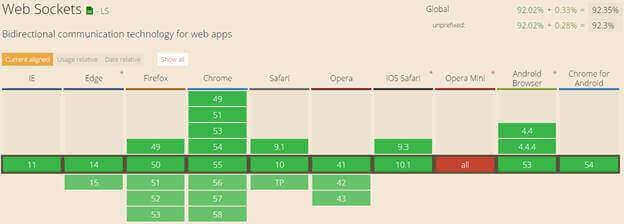
Yes, all major browsers support WebSockets, and well-known websites such as Stack Overflow use them.
Source: https://caniuse.com/#feat=websockets
#How to use Web Sockets?
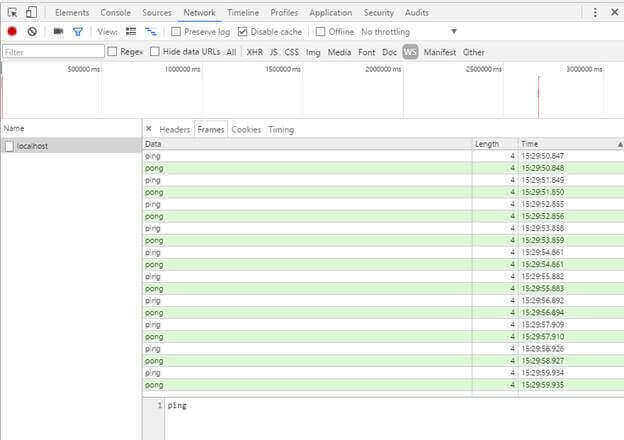
In this post, we'll create a simple web application that uses web sockets. The client opens the web socket, then the server sends "ping" every second to the client, and the client replies "pong".
First, we need to configure the server to accept web sockets:
Create an ASP.NET Core project
Add the NuGet package Microsoft.AspNetCore.WebSockets (NuGet, GitHub)
Edit the Startup.cs file
C#
public class Startup
{
    public void Configure(IApplicationBuilder app, IHostingEnvironment env, ILoggerFactory loggerFactory)
    {
        // ...

        // Accept web socket requests
        app.UseWebSockets();
        // handle web socket requests
        app.UseMiddleware<SampleWebSocketMiddleware>();
    }
}
Create the Middleware that handles the web socket requests
The code is straightforward. The Invoke method gets the socket if available and uses it to send and receive data. We also create two helpers to send and receive text data over the socket. The receive method is slightly more complex because data sent by the client can be chunked, meaning we must collect all packets before assembling the final string.
C#
public class SampleWebSocketMiddleware
{
    private readonly RequestDelegate _next;

    public SampleWebSocketMiddleware(RequestDelegate next)
    {
        _next = next;
    }

    public async Task Invoke(HttpContext context)
    {
        if (!context.WebSockets.IsWebSocketRequest)
        {
            // Not a web socket request
            await _next.Invoke(context);
            return;
        }

        var ct = context.RequestAborted;
        using (var socket = await context.WebSockets.AcceptWebSocketAsync())
        {
            for (var i = 0; i < 10; i++)
            {
                await SendStringAsync(socket, "ping", ct);
                var response = await ReceiveStringAsync(socket, ct);
                if (response != "pong")
                {
                    await socket.CloseAsync(WebSocketCloseStatus.NormalClosure, "Expected 'pong'", ct);
                    return;
                }

                await Task.Delay(1000, ct);
            }
        }
    }

    private static Task SendStringAsync(WebSocket socket, string data, CancellationToken ct = default)
    {
        var buffer = Encoding.UTF8.GetBytes(data);
        var segment = new ArraySegment<byte>(buffer);
        return socket.SendAsync(segment, WebSocketMessageType.Text, true, ct);
    }

    private static async Task<string> ReceiveStringAsync(WebSocket socket, CancellationToken ct = default)
    {
        // Message can be sent by chunk.
        // We must read all chunks before decoding the content
        var buffer = new ArraySegment<byte>(new byte[8192]);
        using (var ms = new MemoryStream())
        {
            WebSocketReceiveResult result;
            do
            {
                ct.ThrowIfCancellationRequested();

                result = await socket.ReceiveAsync(buffer, ct);
                ms.Write(buffer.Array, buffer.Offset, result.Count);
            }
            while (!result.EndOfMessage);

            ms.Seek(0, SeekOrigin.Begin);
            if (result.MessageType != WebSocketMessageType.Text)
                throw new Exception("Unexpected message");

            // Encoding UTF8: https://tools.ietf.org/html/rfc6455#section-5.6
            using (var reader = new StreamReader(ms, Encoding.UTF8))
            {
                return await reader.ReadToEndAsync();
            }
        }
    }
}
That's all for the server side. Now we can build the client with just a few lines of JavaScript. First, we create a WebSocket object. The URL uses the ws:// scheme (or wss:// for HTTPS – get a free certificate with Let's Encrypt). To send data to the server, call the send method. To receive data from the server, use the onmessage callback. Here's the full code:
HTML
<button id="BtnStart">Start</button>
<script>
    var btnStart = document.getElementById("BtnStart");
    btnStart.addEventListener("click", function (e) {
        e.preventDefault();

        var protocol = location.protocol === "https:" ? "wss:" : "ws:";
        var wsUri = protocol + "//" + window.location.host;
        var socket = new WebSocket(wsUri);
        socket.onopen = e => {
            console.log("socket opened", e);
        };

        socket.onclose = function (e) {
            console.log("socket closed", e);
        };

        socket.onmessage = function (e) {
            console.log(e);
            socket.send("pong");
        };

        socket.onerror = function (e) {
            console.error(e.data);
        };
    });
</script>
You can see the result by opening Chrome developer tools:
#Azure Hosting
If you are hosting your application on Azure, don't forget to enable the Web Sockets protocol.

#Conclusion
WebSockets are now well supported by all major browsers and straightforward to use. It's time to add real-time communication to your websites.
You'll find a working example of web sockets on my web crawler project.
Do you have a question or a suggestion about this post? Contact me!
