API versioning is a practice that aligns with Postel's Law. Jon Postel wrote this law in an early specification of TCP:
Be conservative in what you do, be liberal in what you accept from others
Jon Postel
This means you should be conservative in what you send and liberal in what you accept. Once you publish a version of your API, you cannot change the format of the data it sends to clients. Adding a new property to a JSON payload or changing the output formatting can be a breaking change. If you need to change your API's output, versioning is the solution.
#Multiple ways to version an API
There are multiple ways to version an API. Here are the most common approaches:
Creating a new route
// v1
GET https://example.com/api/weatherforecast

// v2
GET https://example.com/api/weatherforecast2
Adding the version in the query string
// v1
GET https://example.com/api/weatherforecast?api-version=1.0

// v2
GET https://example.com/api/weatherforecast?api-version=2.0
Adding the version in the header
// v1
GET https://example.com/api/weatherforecast
X-API-VERSION: 1.0

// v2
GET https://example.com/api/weatherforecast
X-API-VERSION: 1.0
Adding the version in the header Accept
// v1
GET https://example.com/api/weatherforecast
Accept: application/json;v=1.0

// v2
GET https://example.com/api/weatherforecast
Accept: application/json;v=2.0
Using the request path to define the version
// v1
GET https://example.com/api/v1.0/weatherforecast

// v2
GET https://example.com/api/v2.0/weatherforecast
#Versioning in ASP.NET Core
Microsoft provides a ready-to-use NuGet package to support versioning. It supports most of the versioning schemes described in the previous section out of the box, and is extensible if you need a custom versioning strategy.
Install the package Microsoft.AspNetCore.Mvc.Versioning:
csproj (MSBuild project file)
<ItemGroup>
    <PackageReference Include="Microsoft.AspNetCore.Mvc.Versioning" Version="4.1.1" />
</ItemGroup>
Add the API versioning services:
C#
    public class Startup
    {
        public void ConfigureServices(IServiceCollection services)
        {
            services.AddControllers();

            // Documentation: https://github.com/microsoft/aspnet-api-versioning/wiki/API-Versioning-Options
            services.AddApiVersioning(options =>
            {
                // Add the headers "api-supported-versions" and "api-deprecated-versions"
                // This is better for discoverability
                options.ReportApiVersions = true;

                // AssumeDefaultVersionWhenUnspecified should only be enabled when supporting legacy services that did not previously
                // support API versioning. Forcing existing clients to specify an explicit API version for an
                // existing service introduces a breaking change. Conceptually, clients in this situation are
                // bound to some API version of a service, but they don't know what it is and never explicit request it.
                options.AssumeDefaultVersionWhenUnspecified = true;
                options.DefaultApiVersion = new ApiVersion(2, 0);

                // Defines how an API version is read from the current HTTP request
                options.ApiVersionReader = ApiVersionReader.Combine(
                    new QueryStringApiVersionReader("api-version"),
                    new HeaderApiVersionReader("api-version"));
            });
        }
Modify the controller to specify the version:
C#
using Microsoft.AspNetCore.Mvc;

namespace WebApplication1.Controllers
{
    [ApiController]
    [Route("HelloWorld")]
    [ApiVersion("1.0", Deprecated = true)]
    public class HelloWorld1Controller : ControllerBase
    {
        [HttpGet]
        public string Get() => "v1.0";
    }

    [ApiController]
    [Route("HelloWorld")]
    [ApiVersion("2.0")]
    public class HelloWorld2Controller : ControllerBase
    {
        [HttpGet]
        public string Get() => "v2.0";
    }
}
You can now query https://localhost:44316/helloworld?api-version=2.0 and check the result:
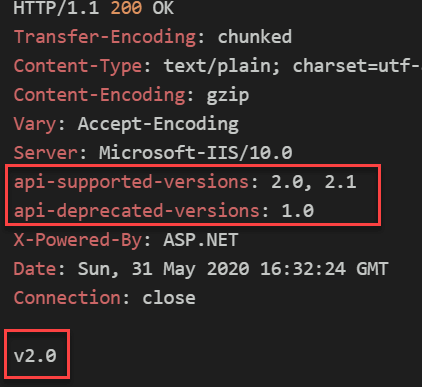
In the example above, each version has its own controller. If a controller has multiple methods, you may not want to duplicate the entire controller. Instead, add only the new method and decorate it with [MapToApiVersion("")]:
C#
// 👇 Declare both versions
[ApiVersion("2.0")]
[ApiVersion("2.1")]
[ApiController, Route("HelloWorld")]
public class HelloWorld2Controller : ControllerBase
{
    // Common to v2.0 and v2.1
    // You can use HttpContext.GetRequestedApiVersion to get the matched version
    [HttpPost]
    public string Post() => "v" + HttpContext.GetRequestedApiVersion();

    // 👇 Map to v2.0
    [HttpGet, MapToApiVersion("2.0")]
    public string Get() => "v2.0";

    // 👇 Map to v2.1
    [HttpGet, MapToApiVersion("2.1")]
    public string Get2_1() => "v2.1";
}
In the example above, clients can specify the API version via query string or a custom header. To use path-based versioning, such as https://example.com/api/v2.0/helloworld, update the route:
C#
// Will match "/v1.0/HelloWorld" and "/HelloWorld?api-version=1.0"
[ApiController]
[Route("HelloWorld")] // Support query string / header versioning
[Route("v{version:apiVersion}/HelloWorld")] // Support path versioning
[ApiVersion("1.0")]
public class HelloWorld1Controller : ControllerBase
{
    public string Get() => "v1.0";
}
#Integration with OpenAPI Specification (Swagger)
When you have multiple API versions, you should generate a separate Swagger file for each version. The code is copied from https://github.com/microsoft/aspnet-api-versioning/tree/master/samples/aspnetcore/SwaggerSample
Add the NuGet packages Swashbuckle.AspNetCore and Microsoft.AspNetCore.Mvc.Versioning.ApiExplorer:
csproj (MSBuild project file)
<ItemGroup>
    <PackageReference Include="Swashbuckle.AspNetCore" Version="5.4.1" />
    <PackageReference Include="Microsoft.AspNetCore.Mvc.Versioning" Version="4.1.1" />
    <PackageReference Include="Microsoft.AspNetCore.Mvc.Versioning.ApiExplorer" Version="4.1.1" />
</ItemGroup>
Edit the startup.cs file to configure Swagger
C#
public class Startup
{
    public void ConfigureServices(IServiceCollection services)
    {
        services.AddControllers();

        services.AddApiVersioning(options =>
        {
            options.DefaultApiVersion = new ApiVersion(2, 0);
            options.AssumeDefaultVersionWhenUnspecified = true;
            options.ReportApiVersions = true;
            options.ApiVersionReader = ApiVersionReader.Combine(
                new QueryStringApiVersionReader("api-version"),
                new HeaderApiVersionReader("api-version"));
        });

        services.AddVersionedApiExplorer(options =>
        {
                // add the versioned api explorer, which also adds IApiVersionDescriptionProvider service
                // note: the specified format code will format the version as "'v'major[.minor][-status]"
                options.GroupNameFormat = "'v'VVV";

                // note: this option is only necessary when versioning by url segment. the SubstitutionFormat
                // can also be used to control the format of the API version in route templates
                options.SubstituteApiVersionInUrl = true;
        });
        services.AddTransient<IConfigureOptions<SwaggerGenOptions>, ConfigureSwaggerOptions>();
        services.AddSwaggerGen(options => options.OperationFilter<SwaggerDefaultValues>());

    }

    // This method gets called by the runtime. Use this method to configure the HTTP request pipeline.
    public void Configure(IApplicationBuilder app, IWebHostEnvironment env, IApiVersionDescriptionProvider provider)
    {
        if (env.IsDevelopment())
        {
            app.UseDeveloperExceptionPage();
        }

        app.UseHttpsRedirection();
        app.UseRouting();
        app.UseSwagger();
        app.UseSwaggerUI(
            options =>
            {
                // build a swagger endpoint for each discovered API version
                foreach (var description in provider.ApiVersionDescriptions)
                {
                    options.SwaggerEndpoint($"/swagger/{description.GroupName}/swagger.json", description.GroupName.ToUpperInvariant());
                }
            });

        app.UseAuthorization();
        app.UseEndpoints(endpoints =>
        {
            endpoints.MapControllers();
        });
    }
}

public class SwaggerDefaultValues : IOperationFilter
{
    public void Apply(OpenApiOperation operation, OperationFilterContext context)
    {
        var apiDescription = context.ApiDescription;
        operation.Deprecated |= apiDescription.IsDeprecated();

        if (operation.Parameters == null)
            return;

        // REF: https://github.com/domaindrivendev/Swashbuckle.AspNetCore/issues/412
        // REF: https://github.com/domaindrivendev/Swashbuckle.AspNetCore/pull/413
        foreach (var parameter in operation.Parameters)
        {
            var description = apiDescription.ParameterDescriptions.First(p => p.Name == parameter.Name);
            if (parameter.Description == null)
            {
                parameter.Description = description.ModelMetadata?.Description;
            }

            if (parameter.Schema.Default == null && description.DefaultValue != null)
            {
                parameter.Schema.Default = new OpenApiString(description.DefaultValue.ToString());
            }

            parameter.Required |= description.IsRequired;
        }
    }
}

public class ConfigureSwaggerOptions : IConfigureOptions<SwaggerGenOptions>
{
    private readonly IApiVersionDescriptionProvider _provider;

    public ConfigureSwaggerOptions(IApiVersionDescriptionProvider provider) => _provider = provider;

    public void Configure(SwaggerGenOptions options)
    {
        // add a swagger document for each discovered API version
        // note: you might choose to skip or document deprecated API versions differently
        foreach (var description in _provider.ApiVersionDescriptions)
        {
            options.SwaggerDoc(description.GroupName, CreateInfoForApiVersion(description));
        }
    }

    private static OpenApiInfo CreateInfoForApiVersion(ApiVersionDescription description)
    {
        var info = new OpenApiInfo()
        {
            Title = "Sample API",
            Version = description.ApiVersion.ToString(),
        };

        if (description.IsDeprecated)
        {
            info.Description += " This API version has been deprecated.";
        }

        return info;
    }
}
The generated Swagger files will be available at:
https://example.com/swagger/v1/swagger.json
https://example.com/swagger/v2/swagger.json
https://example.com/swagger/v2.1/swagger.json
#Additional resources
Do you have a question or a suggestion about this post? Contact me!
