The Tab Index defines the order in which controls receive focus when the user presses the Tab key.
You can change this value by selecting a control in the Designer and setting the TabIndex property in the property grid. For a window with only a few controls, this works fine. However, as the window grows more complex, this approach becomes tedious. Fortunately, the Windows Forms designer provides a simple built-in way to view and modify the tab order.
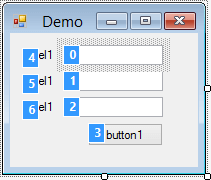
Just click on the controls in the desired order and save. Simple and efficient!
This feature is accessible from the View / Tab Order menu.
No more excuses for not properly managing the tab order of your controls.
This post is part of the series 'Visual Studio Tips and Tricks'. Be sure to check out the rest of the blog posts of the series!
Do you have a question or a suggestion about this post? Contact me!
