This post is part of the series 'Microsoft SQL Server 2016'. Be sure to check out the rest of the blog posts of the series!
SQL Server 2016 has recently been released. In this post, we explore the Always Encrypted feature, one of the key additions in this version.
Encrypting sensitive data such as personal information is important for security. SQL Server already offers encryption through T-SQL ENCRYPTBY... functions, but every insert and select query must call these functions explicitly. Another option is Transparent Data Encryption (TDE), which encrypts database data and log files transparently. However, any user with sufficient permissions can still access the data in plaintext.
Always Encrypted addresses this limitation. Data is encrypted directly (similar to ENCRYPTBY...), but the data encryption key is no longer stored on the database server. Instead, it resides on the application side. Only the application holds the key to decrypt data, and this decryption happens transparently at the application level rather than at the database level. As a result, DBAs cannot view sensitive data.
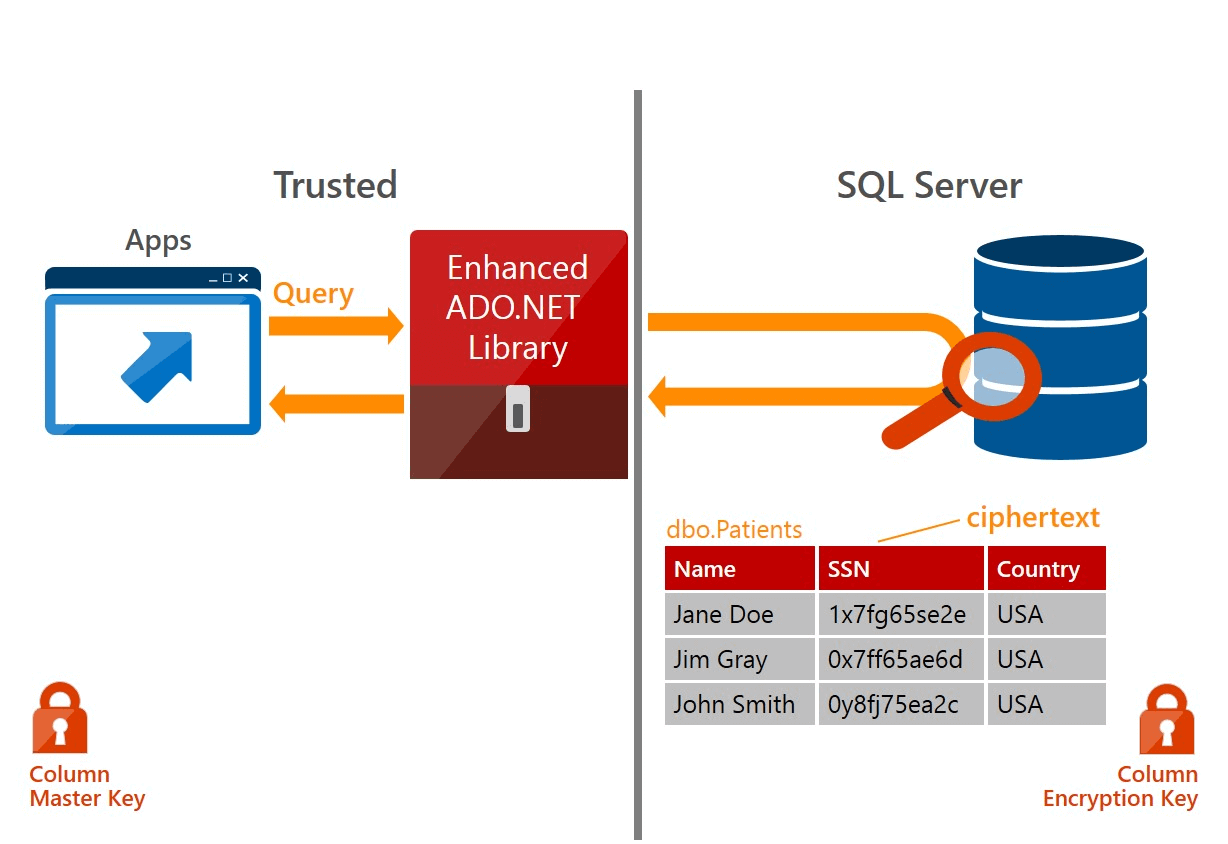
Data can be encrypted in 2 ways:
- Deterministically: encrypting the same data always produces the same result (similar to a hash)
- Randomly: encrypting the same data can produce different results
The first method is used when you need to search on the encrypted column. Only the = and <> operators are supported. The second method does not support searching but offers stronger security.
#Encryption keys
There are 2 types of encryption key:
- Column encryption key: The key to encrypt the contents of a column (stored on SQL side)
- Column master key: The key protecting Column Encryption Keys (stored on application-side)
First, the ADO.NET client sends a request to retrieve the column encryption keys and decrypts them using the master key. When executing a query, it encrypts the parameters that require encryption and sends the query to SQL Server for processing. Finally, the client decrypts the values returned by the server. Data security is thus ensured end-to-end.
#Setting up the server
We start by declaring the Column Master Key. We specify its location on the machine hosting the application and its thumbprint:

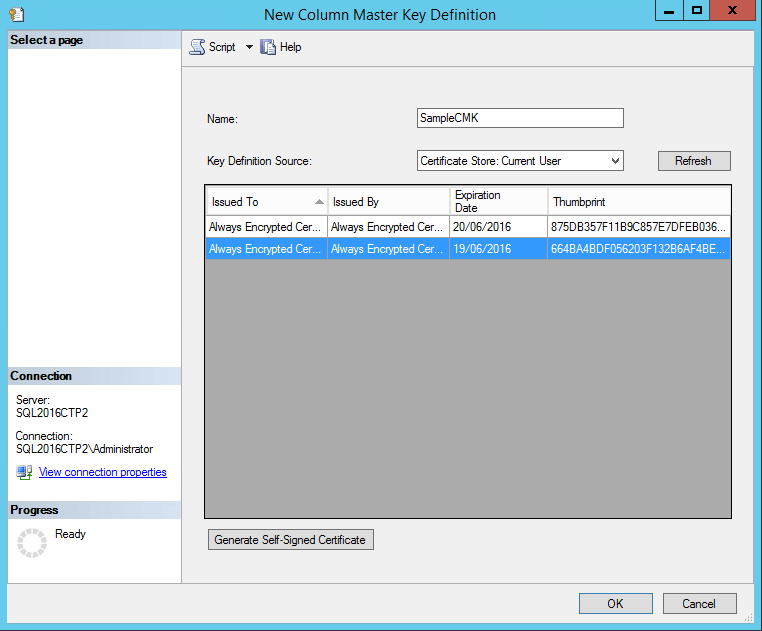
Note that this is just a declaration. The key is not stored on the SQL Server but on the application server.
Now we create the column encryption key:
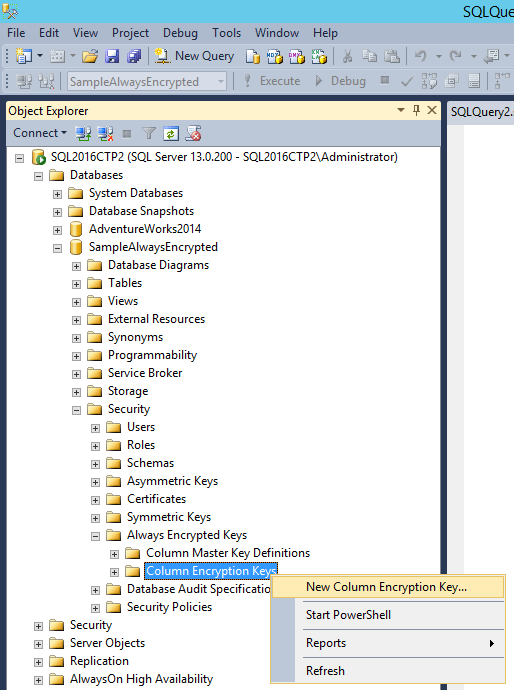
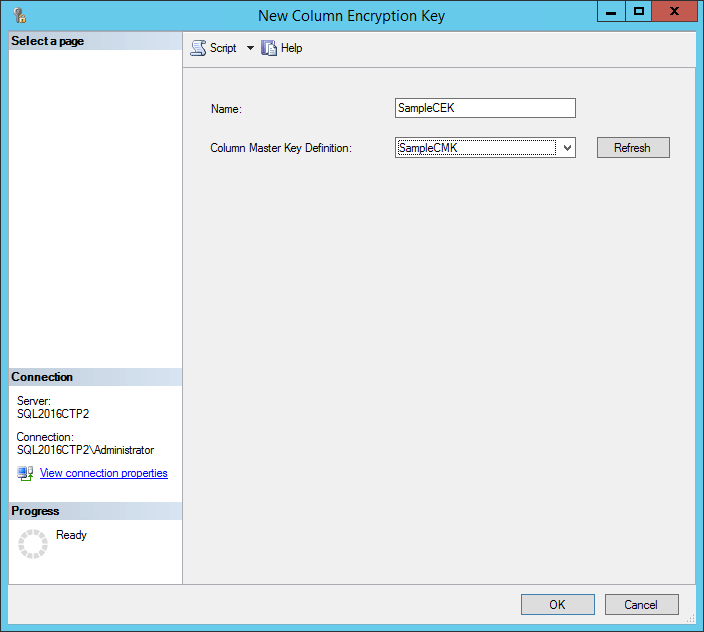
Then we create the table, specifying the encryption key and encryption type for each column to be encrypted:
SQL
CREATE TABLE Patient (
    Id [int] IDENTITY(1,1) NOT NULL PRIMARY KEY,
    [FullName] [nvarchar](50) NULL,

    [SSN] [nvarchar](11) COLLATE Latin1_General_BIN2
    ENCRYPTED WITH (ENCRYPTION_TYPE = DETERMINISTIC,
    ALGORITHM = 'AEAD_AES_256_CBC_HMAC_SHA_256',
    COLUMN_ENCRYPTION_KEY = SampleCEK) NOT NULL,

    PhoneNumber nchar(10)
    ENCRYPTED WITH (ENCRYPTION_TYPE = RANDOMIZED,
    ALGORITHM = 'AEAD_AES_256_CBC_HMAC_SHA_256',
    COLUMN_ENCRYPTION_KEY = SampleCEK) NOT NULL
)
#Setting up the client
The first thing is to indicate in the connection string that we want to use Always Encrypted:
C#
string connectionString = "Data Source=(local);Database=SampleAlwaysEncrypted; Integrated Security=true;Column Encryption Setting=enabled";
From there, everything works normally. The only requirement is to use parameterized queries, which is already a best practice. For example, to insert a row:
C#
using (var connection = new System.Data.SqlClient.SqlConnection(connectionString))
{
    connection.Open();
    using (var command = connection.CreateCommand())
    {
        command.CommandText = "INSERT INTO Patient(FullName, SSN, PhoneNumber) VALUES (@FullName, @SSN, @PhoneNumber)";
        command.CommandType = System.Data.CommandType.Text;

        var fullNameParameter = command.CreateParameter();
        fullNameParameter.ParameterName = "@FullName";
        fullNameParameter.Value = "John Doe";
        command.Parameters.Add(fullNameParameter);

        var ssnParameter = command.CreateParameter();
        ssnParameter.ParameterName = "@SSN";
        ssnParameter.Value = "1234";
        command.Parameters.Add(ssnParameter);

        var phoneNumberParameter = command.CreateParameter();
        phoneNumberParameter.ParameterName = "@PhoneNumber";
        phoneNumberParameter.Value = "0123456789";
        command.Parameters.Add(phoneNumberParameter);

        int result = command.ExecuteNonQuery();
    }
}
Since the SSN column uses deterministic encryption, you can search using this parameter:
C#
using (var command = connection.CreateCommand())
{
    command.CommandText = "SELECT * FROM dbo.Customer WHERE SSN = @SSN";
    command.CommandType = System.Data.CommandType.Text;
    var parameter = command.CreateParameter();
    parameter.ParameterName = "@SSN";
    parameter.Value = "1234";
    command.Parameters.Add(parameter);

    using (var reader = command.ExecuteReader())
    {
        while (reader.Read())
        {
            Console.WriteLine(reader.GetString(reader.GetOrdinal("SSN")));
        }
    }
}
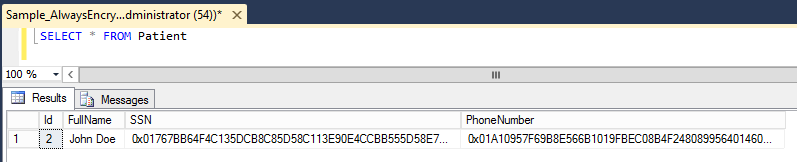
If we look at the table contents, we can see that the data is encrypted:
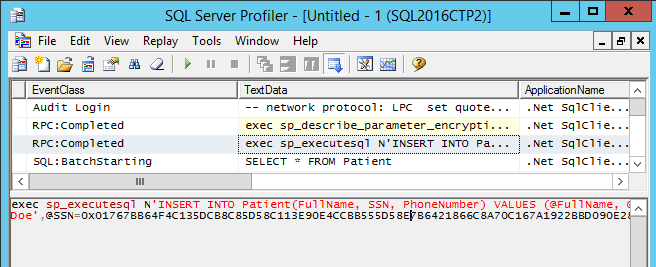
Using SQL Server Profiler, we can also confirm that the data is encrypted during insertion:
#Conclusion
Always Encrypted provides a transparent data encryption solution that ensures only the application can decrypt sensitive data. This greatly reduces the risk of unauthorized access, including by database administrators.
Do you have a question or a suggestion about this post? Contact me!
