This post is part of the series 'Roslyn Analyzers'. Be sure to check out the rest of the blog posts of the series!
In a previous blog post, I explained how to write a Roslyn Analyzer for C#. That analyzer uses the C# syntax tree and semantic model to detect patterns and report warnings, and the code fix replaces nodes in the C# syntax tree. Because of this, the analyzer cannot be used for VB.NET, since the syntax tree is different. You would need to create and maintain a separate analyzer for each language. This is possible, and many analyzers work this way, but the maintenance cost is high. The Roslyn team addressed this with a new solution: IOperation!
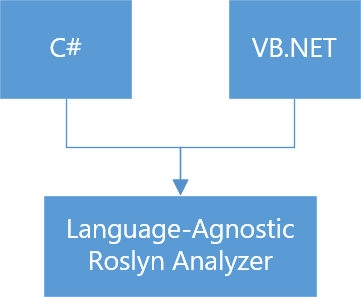
C# and VB.NET have different syntaxes, but they can express the same concepts. The syntax differs, but the semantics are the same. The Roslyn team's approach is to generate a higher-level model above the syntax tree that can be mapped back to a C# or VB.NET syntax tree. This model is not the same as the Roslyn semantic model; it is more of a blend of the syntax tree and the semantic model.
For instance, Dim numbers(2) As Integer and var numbers = new int[2] are semantically identical. Both create a single-dimensional array of 2 elements. You can also create the array using var numbers = new int[] { 1, 2 }. Even though the syntax trees differ, all three expressions create a new array. When using operations, all three are represented as an IArrayCreationOperation, which exposes the dimensions of the array.
Let's create a language-agnostic analyzer to replace zero-length array creation (new T[0] or new T[] { }) with Array.Empty<T>().
The structure is very similar to the analyzer from the previous post. This time, we add Visual Basic to the list of supported languages and use RegisterOperationAction to register the analyzer instead of RegisterSyntaxNodeAction.
C#
// You can declare CSharp and Visual Basic as the analyzer is language agnostic
[DiagnosticAnalyzer(LanguageNames.CSharp, LanguageNames.VisualBasic)]
public class UseArrayEmptyAnalyzer : DiagnosticAnalyzer
{
    private static readonly DiagnosticDescriptor s_rule = new DiagnosticDescriptor(
        "Sample",
        title: "Use Array.Empty<T>()",
        messageFormat: "Use Array.Empty<T>()",
        RuleCategories.Usage,
        DiagnosticSeverity.Warning,
        isEnabledByDefault: true,
        description: "");

    public override ImmutableArray<DiagnosticDescriptor> SupportedDiagnostics => ImmutableArray.Create(s_rule);

    public override void Initialize(AnalysisContext context)
    {
        context.EnableConcurrentExecution();
        context.ConfigureGeneratedCodeAnalysis(GeneratedCodeAnalysisFlags.None);

        // Will call AnalyzeArrayCreationOperation for each ArrayCreation operation
        context.RegisterOperationAction(AnalyzeArrayCreationOperation, OperationKind.ArrayCreation);
    }

    private void AnalyzeArrayCreationOperation(OperationAnalysisContext context)
    {
        // Cast the operation to the actual operation type. You can get the type by looking at the XML documentation of the OperationKind enum members.
        // https://github.com/dotnet/roslyn/blob/6e63c8f74ab8e8af9a545a6625907f529c843d62/src/Compilers/Core/Portable/Operations/OperationKind.cs
        var operation = (IArrayCreationOperation)context.Operation;
        if (IsZeroLengthArrayCreation(operation))
        {
            // We can access the original C# or VB.NET syntax node using operation.Syntax.
            // This way we can get the location to report the diagnostic
            var diagnostic = Diagnostic.Create(s_rule, operation.Syntax.GetLocation());
            context.ReportDiagnostic(diagnostic);
        }
    }

    private static bool IsZeroLengthArrayCreation(IArrayCreationOperation operation)
    {
        // Check if the array has only 1 dimension
        // new int[]  : 1 dimension
        // new int[,] : 2 dimensions
        if (operation.DimensionSizes.Length != 1)
            return false;

        // Get the size of the first dimension
        // ConstantValue is the actual value as an object
        var dimensionSize = operation.DimensionSizes[0].ConstantValue;
        return dimensionSize.HasValue && (int)dimensionSize.Value == 0;
    }
}
Next, we need to create the code fix. It should also be language-agnostic, so instead of using the syntax tree directly, we use SyntaxGenerator, which produces the correct SyntaxNode for the target language. Its API is similar to CodeDom and straightforward to use.
C#
// You can declare CSharp and Visual Basic as the code fix is language agnostic
[ExportCodeFixProvider(LanguageNames.CSharp, LanguageNames.VisualBasic), Shared]
public sealed class UseArrayEmptyFixer : CodeFixProvider
{
    public override ImmutableArray<string> FixableDiagnosticIds => ImmutableArray.Create("Sample");

    public override FixAllProvider GetFixAllProvider() => WellKnownFixAllProviders.BatchFixer;

    public override async Task RegisterCodeFixesAsync(CodeFixContext context)
    {
        var root = await context.Document.GetSyntaxRootAsync(context.CancellationToken).ConfigureAwait(false);
        var nodeToFix = root.FindNode(context.Span, getInnermostNodeForTie: true);
        if (nodeToFix == null)
            return;

        var title = "Use Array.Empty<T>()";
        var codeAction = CodeAction.Create(
            title,
            ct => ConvertToArrayEmpty(context.Document, nodeToFix, ct),
            equivalenceKey: title);

        context.RegisterCodeFix(codeAction, context.Diagnostics);
    }

    private static async Task<Document> ConvertToArrayEmpty(Document document, SyntaxNode nodeToFix, CancellationToken cancellationToken)
    {
        var editor = await DocumentEditor.CreateAsync(document, cancellationToken).ConfigureAwait(false);

        var semanticModel = await document.GetSemanticModelAsync(cancellationToken).ConfigureAwait(false);

        // Get the generator that will generate the SyntaxNode for the expected language (C# or VB.NET)
        var generator = editor.Generator;

        // Get the type of the elements of the array (new int[] => int)
        var elementType = GetArrayElementType(nodeToFix, semanticModel, cancellationToken);
        if (elementType == null)
            return document;

        // Generate the new node "Array.Empty<T>()" (replace T with elementType)
        var arrayTypeSymbol = semanticModel.Compilation.GetTypeByMetadataName("System.Array");
        var arrayEmptyName = generator.MemberAccessExpression(
            generator.TypeExpression(arrayTypeSymbol),
            generator.GenericName("Empty", elementType));
        var arrayEmptyInvocation = generator.InvocationExpression(arrayEmptyName);

        // Replace the old node with the new node in the document
        editor.ReplaceNode(nodeToFix, arrayEmptyInvocation);
        return editor.GetChangedDocument();
    }

    private static ITypeSymbol GetArrayElementType(SyntaxNode arrayCreationExpression, SemanticModel semanticModel, CancellationToken cancellationToken)
    {
        var typeInfo = semanticModel.GetTypeInfo(arrayCreationExpression, cancellationToken);
        var arrayType = (IArrayTypeSymbol)(typeInfo.Type ?? typeInfo.ConvertedType);
        return arrayType?.ElementType;
    }
}
Writing an analyzer using IOperation is easier and more readable than working with language-specific syntax nodes. However, you have less control over code generation, and since only a subset of C# and VB.NET constructs is supported, not all analyzers can be written this way. I hope the coverage of IOperation grows over time to support more scenarios.
Do you have a question or a suggestion about this post? Contact me!
